Monday, April 20, 2015

New Club and Event Level Users

As experienced users of Regatta Network know, in the past we had 3 basic users - the Club Admin or "super user" with access to all aspects of all events within their club, and Event Admin and Event Scorer users with access limited to specific events and functions.

Today we're rolling our an expanded User functionality for both Club and Event users.  As the Club Admin, you can now assign the following additional club level users for your club:
  • Admin, 
  • Principal Race Officer (PRO) 
  • Scorer,
  • Protest Committee/Jury Secretary
These club level users will have access to all events for your club, but will only have access to those specific areas necessary to complete their tasks.

Also, we're introducing two new levels of event users
  • Event Level Admin, 
  • Event Level PRO (New!
  • Event Scorer
  • Event Level Protest Committee/Jury Secretary (New!)
These users will have access only to the event or events assigned to them, and again, only access to the areas necessary to their specific tasks.

Setting up these users is easy.  Simply add their name and email to either the Club Information page from the Club Management Menu on the screen left menu, or from the first tab of the Edit Event Information console. 


When you save your changes an message will be sent to the email address provided with a notification that they have been assigned a specific for your club or event.  If it is the first time they've been assigned as a user, the email will include instructions on how to log in with their email and an assigned password.

If they've been assigned as a user on another event for you club or another club, they will receive an email notifying them that they have been granted access to a new event.

For more information, please watch the video here.


Wednesday, March 25, 2015

Regatta Network Calendar State Search

To make searches for your entrants easier, we've added a state search to the calendar on www.regattanetwork.com.  Simply click in the box labeled "Select State", and click one or more states to see just the events near your home.

Click here to give it a try now.

Friday, April 25, 2014

Introducing free 3D Regatta Replays from RaceQs.

Regatta Network is proud to introduce raceQs, a free phone app that creates 3D regatta replays. 
The sailing app from raceQs is a free phone app that turns a smart phone into a GPS tracker.  The app records detailed information about your race and automatically creates a 3D Regatta Replay animation. RaceQs.com replays are a great way to improve sailing performance or simply to enjoy the race again. The setup process is really simple, for both you and your sailors. All your sailors will need is a smart phone, and the FREE raceQs app for iPhone and Android.
After running raceQs' app during the race, sailors can watch a 3D replay of  the entire fleet, online.  The replays are based in Google Earth, so permanent marks, city front, and landmarks are all visible alongside the animated sailboat fleet.  Many clubs have had great fun playing the replay on a large TV at the awards party, adding a whole new dimension to the tactical discussions and post-race protest negotiations. 
For more information visit http://raceqs.com/regattas/

Scrolling Results for an individual race.

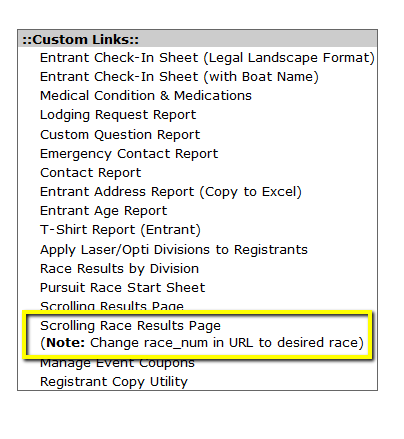
Several clubs have requested a scrolling version of the single race scores for all fleets in their series.  This allows the results from a single race to be displayed on screens or tv's around the club.  To accommodate this request we've added a link to the custom links section of the event console. 

By default the link is set to race 1, so to display the detail of another race simply edit the number following the "&race_num=" at the end of the web address in the URL toolbar.  The scroll speed is set to 1, if you would like the page to scroll at a faster pace, simply change the value following "&scrolling=" to a larger number.  There is an example of this page HERE

Naturally, the Scrolling results page is still available that will show the complete results for the series or regatta.  

Wednesday, February 26, 2014

Deleting Events

One of the most asked questions is "How do I delete an event?"  The short answer is, when logged in as the account admin, simpl;y click on the trash can icon above the event menu.  


The system will ask you to confirm with the primary password, and the event will be deleted.  

Wednesday, September 25, 2013

Formatting Printed Reports

Several clubs have asked about changing the formatting of the printed reports generated by Regatta Network.  When these reports are generated as web pages the font size is dynamic and usually adjusted by the setting on each user's browser.  But when printing the report from a browser, the print function will often revert to the stated size of the font as defined in the css or html for the page, which appears to be about 10pt on the printed page.

However there are several options to enlarging the printed version of the page.
  1. Using print preview in your browser, minimize the borders on the page, and print a test page or two. 
  2. Not big enough?   Try changing the page layout from letter to landscape.  At the same time you may need to adjust the scaling on the page to maximize the font size.  Again, print a test page or two.  
  3. Still not big enough?  All reports in Regatta Network are created as an HTML table, as such you can highlight the page with your mouse, and paste it into MS Excel.  Then you can adjust the font size, column width, page breaks, etc. without wasting paper. 
Remember, each browser and printer combination is a bit different, so you may want to experiment with different browsers to see if one combination works best for your event.  Also, it's important to use the print preview function of your browser or Excel, and to save paper. 


Monday, June 10, 2013

Who is Crew?

One of the most frequent questions we get from organizers is "How can I see the information from an in line crew registration."  As you may know, the crew registration follows the skipper/helm's primary registration, on subsequent pages. 

We have added a new feature to link directly to the crew registration from the Edit Event Entries pages.  Simply select the crew option from the show hide columns menu, and click on the crew members name.  No more paging through the registration pages to see the crew information. 

Expanded Console for Storefront Customers

We have recently completed a major enhancement to the customer console for Event Stores.  You can now select whether to view just the store customer, just the event entrants that made purchases through the store, or both.

We have also added the ability for the organizer to select the columns they wish to view, sort by any column or columns, and search for a specific record based on the customer or entrants name.  See video tour below.


Thursday, January 24, 2013

Add Social Network Links to Your Event Site

We've added the option to link your event site directly to the Facebook and Twitter page for your event.  Simply add the links to the appropriate fields on Edit Event Information, and the media tiles will be added to the navigation bar on your event site. 


See example of these tiles in action here

Monday, November 5, 2012

New! - List Multiple Skippers/Co-Owners

At the request of several organizers and classes, event organizers now have the option to allow the listing of Multiple Skippers or Co-Owners on you event.  Simply check the box labeled "Allow Multiple Skipper/Owner Name(s)" to enable this feature.  


It will add a text box for the additional skippers to the registration form as shown below.  Multiple names can be separated by a comma, up to 160 characters.  Note that it will NOT add any additional email or other contact information for the entry, and will only list the name (or names) entered on the entrant lists and results pages.  


Thursday, March 29, 2012

New Discounts for Membership Module Users

For sometime now, Clubs and Associations who have taken advantage of the Regatta Networks Membership Module have been able to host events on Regatta Networks that allow only current and verified members. Due to recent requests, we've added a new type of discount within the fee system that can be applied to only verified members, while allowing non-members to still register for the event. This is a great way to both encourage non-members to join your membership as well as reward your current members via discounted registration fees.
To activate this discount fee type, you must first setup your event to validate your association as well as allow non-members to register (Located in "Edit Event Information" under the 'Form Questions' tab) :
Now that you've enable Class Association verification with Non-Member allowance, you'll have access to your discount in the fee editor:

After the fee is added, registrants will be notified on the registration form that the discount applies to members:


Wednesday, November 30, 2011

What's This? Your Event's QR code!


Some of you may have noticed that we've added an event specific QR Code to all events. This code is a graphic bar code to take your potential registrants or registrants directly to an event page designed specifically for smart phones.


This page will give entrants fast access to your event's status (from the online notice board), the registration form, the current entrant list, results, regatta documents, etc. The event status is updated from the Online Notice Board so entrants can know instantly if you event is on schedule, postponed or abandoned by simply checking their phone.

Use the QR code image in your promotional materials - emails, posters, flyers and around the club house to let entrants connect quickly with your event. The QR code image can be downloaded from the Regatta Network event console in a variety of sizes to fit your application.

As always please feel free to contact us for a demonstration or with questions, comments or suggestions.

Wednesday, August 24, 2011

New Event Location Capability


As you may have noticed, in the past the location of an event was assumed to be the same location as the information on the Organizer's Club Information page. Since many event's were organized by a class or YRA with offices in a different location than the actual event. To help with this "dis-location", we've added an event location to all events. Simply list the address for the event and the event will be listed on Regatta Network and RegattaLink with the correct location.

Tuesday, August 9, 2011

Let Your Entrants and Their Supporters Give A Little.

Several times a year, we are approached by clubs or organizations running charity events. They've asked for a method to have their entrants reach out to their supporters to raise money for a worthy cause.


To answer this need, we've developed a Pledge console that let's supporters pledge a donation to the chosen charity to support the efforts of a specific entrant. The way the system works is simple --
  • As sailors enter, they are automatically added to the pledge page.
  • They can then direct their supporters to the pledge page to pledge support for their entry. And they are offered the opportunity to complete their pledge directly with the charity.
  • The progress of each competitor is displayed on a pledge "Leader Board
  • And as the organizer you can provide the charity with the contact information on all pledges, so they can follow up with a thank you or reminder.
To see the pledge system in action, please the CBS Charity Regatta on www.yachtclubdemo.com,
Or you can view the pledge form and tote board from the entry form here

Wednesday, July 20, 2011

Working With Waitlists...

For many youth events, capacity constraints and wait lists are a fact of life. Many facilities can only accommodate a set number of boats. Wait lists in the Regatta Network system are based on the number of paid entrants received for a specific fee. As a reminder, the Waitlist Limit is established when setting up the fee, and will allow entry into your event until the limit is reached.


Once that limit has been reached, and entrants are being actively wait listed, we recommend you revise the Waitlist Limit downward, say from 50 to 35 or 40. This will let you delete entrants that have to drop out and override the wait list status for entrants currently wait listed. Otherwise when you delete a paid entrant, the waitlist will open up for the public, and let anyone jump in line in front of the wait listed entrants.

Step-by-Step: To override the waitlist status for an entrant --
> Click "Edit Event Entries"
> Click on the entrants name
> At the bottom of the next page, click the check box to "Override waitlist for this registrant "
> Click button to Modify this entrant.
> Notify the Entrant either through the email console, or directly to edit their registration form.

Saturday, June 18, 2011

Extend Your Wi-Fi Reach

We've recently begun testing a new High Power Wireless-N USB Adapter from Amped Wireless. This system combines a high power WiFi amplifier and a high gain directional antenna to extend the range of wirless connectivity up to 4x over normal. In many cases, this could extend the range of your laptop on the committee boat to reach a WiFi Hotspot at the club.


The unit is designed to allow you to connect to wireless networks from "extreme distances" and is weatherized for use on boats, RV's etc. The antenna connects to your laptop using a dual USB cable for maximum signal strength, or can connect using a single USB port for standard power and includes 26.5 feet of cable and a variety of mounting options - Wall, pole/mast, or tabletop.


Since it's usefulness depends on the environment at your club and RC boat (distance from the club, trees and other obstructions between the antenna and the WiFi hotspot, we are offering our test antenna on a "lend/lease" program for clubs to try it out before they have to commit to buying it. Basically for the cost of shipping both ways, you can test this system at your location to decide if it is a good solution for your club. Please contact Ken Taylor with questions or to arrange a test.


Sunday, May 22, 2011

Scoring on the Go

Of course, you've always been able to score an event on Regatta Network using a laptop and a Wi-Fi or cellular connection. However lately, clubs have asked about the possibility of scoring using an iPhone, Blackberry, or iPad.

The answer is simply, Yes. Scoring is possible on current versions of both an iPhone or Blackberry. Due to the small screen size, scoring on an hand-held device like an iPhone isn't always as pleasant as scoring on a laptop or even an iPad, but it is possible.

There is a pdf tutorial on iPhone scoring HERE.


Or there is a short video tutorial on scoring with an iPad HERE

Stay tuned for further developments on mobile scoring options on Regatta Network.

Wednesday, April 27, 2011

Simplified Fleet Split Console

A new way to quickly and easily create your fleet splits and move boats from one class to another. A single page shows all entrants, is sortable by handicap/rating and uses a simple drop down to change their class assignments. To use the Fleet/Class Management console, have entrants register in a "parent" fleet, say PHRF. After you've received a number of entries, set up your new "child" classes (PHRF-SpinA, PHRF-SpinB, etc.). When you open the Fleets/Classes console, click on the column header "Rating" and then select the appropriate class from the drop down for each entrant. Click the "Save Fleet Assignments" button at the bottom of the page, and you're ready to go!

Saturday, April 23, 2011

txt 2 ur registrants

Email is a great way to communicated to your registrants before and after the event, but not everyone has the ability to recieve email messages during the event. As such, we're pleased to annouce a new texting console to send sms messages to your registrants regarding updates on you events. This is a great way to keep entrants informed about schedule changes, postpones or protest schedules.


During registration, the entrant will have the option to "opt in" to receive text messages from your event. To send a message select the SMS Text console from the Event Tools menu. You may select all entrants or a specific class to send a short SMS message to them. These messages are limited to 160 characters and will only be sent to those that elected to opt-in.


Because the messages are sent through a third party provider, please only use the console for official messages, rather than news or "social" updates. All messages will come from 258-17 (the Regatta Network "Bulk Account") so try to make it clear that the message is regarding your event in the first few words.

Thursday, December 16, 2010

Club Level Data Downloads

As you know, you've always been able to download the entrant data from a number of reports or the event data feed, however this data has always been event specific. So if you wanted to send everyone an Christmas Card that registered for a regatta in the past year, you had to aggregate the data from several events, and then "clean" the data to remove duplicates.

We've added another club level applet that will allow you to create a registrant data file from all you events within a user selectable date range. This file looks for duplicates based on First Name, Last Name and Email. So if someone registers with their G-mail address one time and their work email the next time, they will be counted as 2 entries. So it's not perfect, but it should cut down on the time required to build your mailing or email list.